
You now have ability to capture photos while carrying out an audit, and tag these photos against specific Product Categories and Subcategories.
Use photos to document shelf displays, inventory issues, or compliance concerns, adding a visual layer of evidence to your audit reports.
Visual proof enhances audit accuracy and helps identify discrepancies.
Photo capture during an audit can be accessed by tapping on the camera icon:
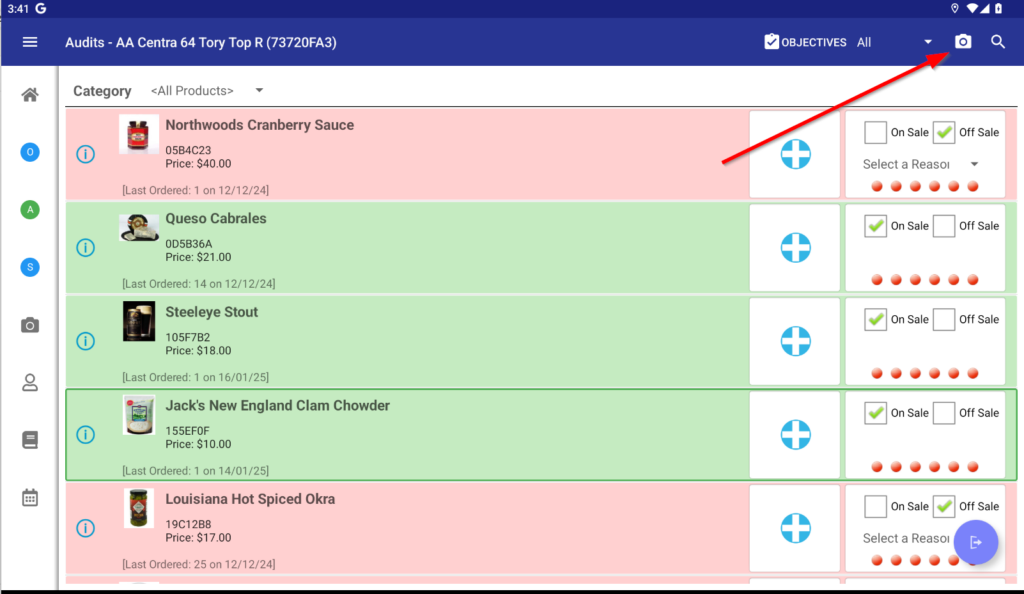
Once a photo is captured, you can tag it with
- Category
- Subcategory
- Tag
- Notes
Tagged photos make it easier for teams to review and address specific findings. Audits can now contain organised, categorised images, saving time when generating detailed audit reports.
We hope you like these improvements, plenty more on the way!
More details about this feature can be found in our knowledge base here:
https://support.wasptech.com/support/solutions/articles/263904-audit-photos-intellibrand-app
As always, if you have any suggestions on how to improve IntelliBrand, please email us at info@wasptech.com
Also, we would love a rating for InteliBrand in the Play Store . . click link to rate:
https://play.google.com/store/apps/details?id=com.wasptech.intellidroid&hl=en_IE