
The new Media Activity feature in your IntelliBrand console enhances your ability to monitor how and when field users engage with media items.
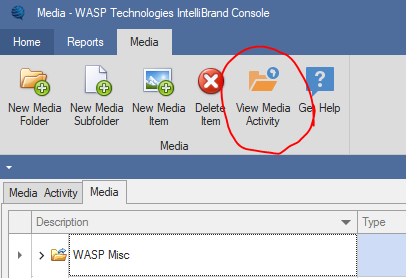
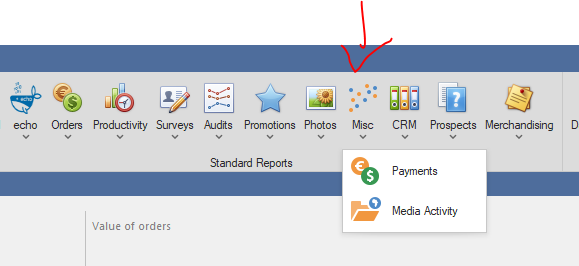
This functionality is accessible via a menu icon within the Media form and as a report under Reports > Misc > Media Activity.
Accessing Media Activity:
- Through the Media Form:
- Navigate to the Media section in your IntelliBrand console.
- Locate and click the View Media Activity icon within the Media form to view detailed usage statistics.
and
2. Via Reports:
- Go to the Reports section in the console.
- Select Misc, then choose Media Activity to generate a comprehensive report on media usage.
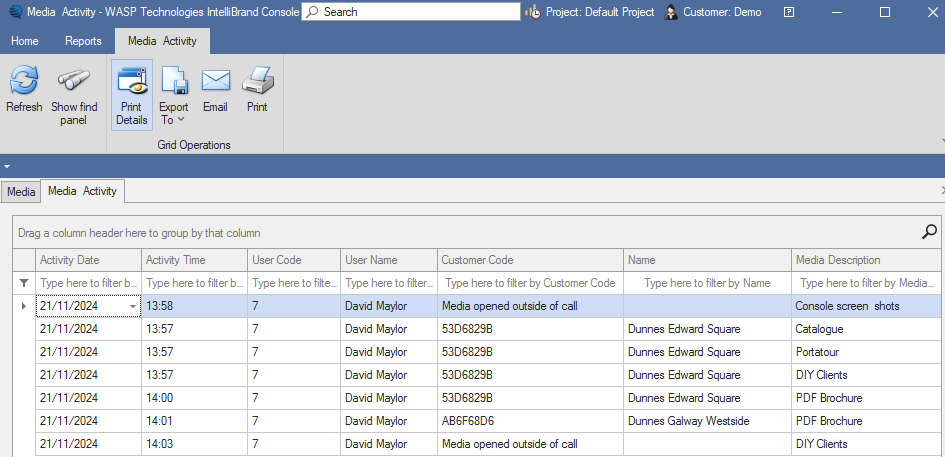
The new option in your IntelliBrand console not only helps track when and where each media item has been accessed by your field users, but also provides additional details if the media item was accessed during a call.
Specifically:
- Date and time when the media item was accessed.
- If the media item was accessed during a call, the system links the access to the respective customer.
- This feature provides a clear record of how media items are being utilized during interactions with customers.
How This Benefits You:
- Optimise media assets for more targeted and effective field operations.
- Gain actionable insights into the effectiveness of your media.
- Understand the context in which media items are used (e.g., specific customer calls or regions).
Please note that your users need to be on the latest version of IntelliBrand as this update includes media access tracking. The latest version is 2024.100.4
We hope you like these improvements, plenty more on the way!
As always, if you have any suggestions on how to improve IntelliBrand, please email us at info@wasptech.com
Also, we would love a rating for InteliBrand in the Play Store . . click link to rate:
https://play.google.com/store/apps/details?id=com.wasptech.intellidroid&hl=en_IE